


I have lost count of how websites I have opened in Screaming Frog and thought the same thing: somebody spent serious money on this website and Google can barely read this website.
The design is clean. The animations are smooth. The brand colours are perfect. But the pages sit five clicks deep the menu is a JavaScript maze half the images weigh 4 MB and the robots.txt file is still telling Google to stay left over from the staging site.
That is the gap this guide’s, about. A looking website and a website that ranks are two different things and the difference is almost always decided during design long before anyone talks about keywords.

What Is SEO-Friendly Website Design?
SEO-friendly website design is the practice of building a website so that search engines can crawl, understand and index it easily, while visitors can use it quickly on any device. It covers the things people see, like layout, navigation and mobile experience, and the things they don’t, like site architecture, URL structure, code, loading performance and structured data.
The simplest way I explain it to clients: Google can’t rank what it can’t reach, and it won’t keep ranking what people leave in three seconds. Your design either helps with both problems or it creates them.
Why Design Decisions Quietly Hurt Rankings
Most ranking problems I find during audits didn’t start with SEO at all. They started in a design file.
A designer chooses a full-screen video hero because it looks premium. A developer adds the menu using JavaScript because the framework makes it easy. Someone changes the URL structure during the redesign because the old one felt messy. Each decision makes sense on its own.. Together they can slow the site down hide links from crawlers and wipe out years of accumulated authority.
That’s why I always say SEO belongs in the design meeting not in the last week before launch. Fixing structure after the build costs three times more, than planning it.
Start With Site Architecture, Not the Homepage
Before you open Figma, decide what pages your website needs and how they connect. This is site architecture, and it’s the foundation everything else sits on.
A healthy structure groups pages by topic, gives every important page one clear purpose and keeps your key pages within three clicks of the homepage. For a service business it usually looks like this:
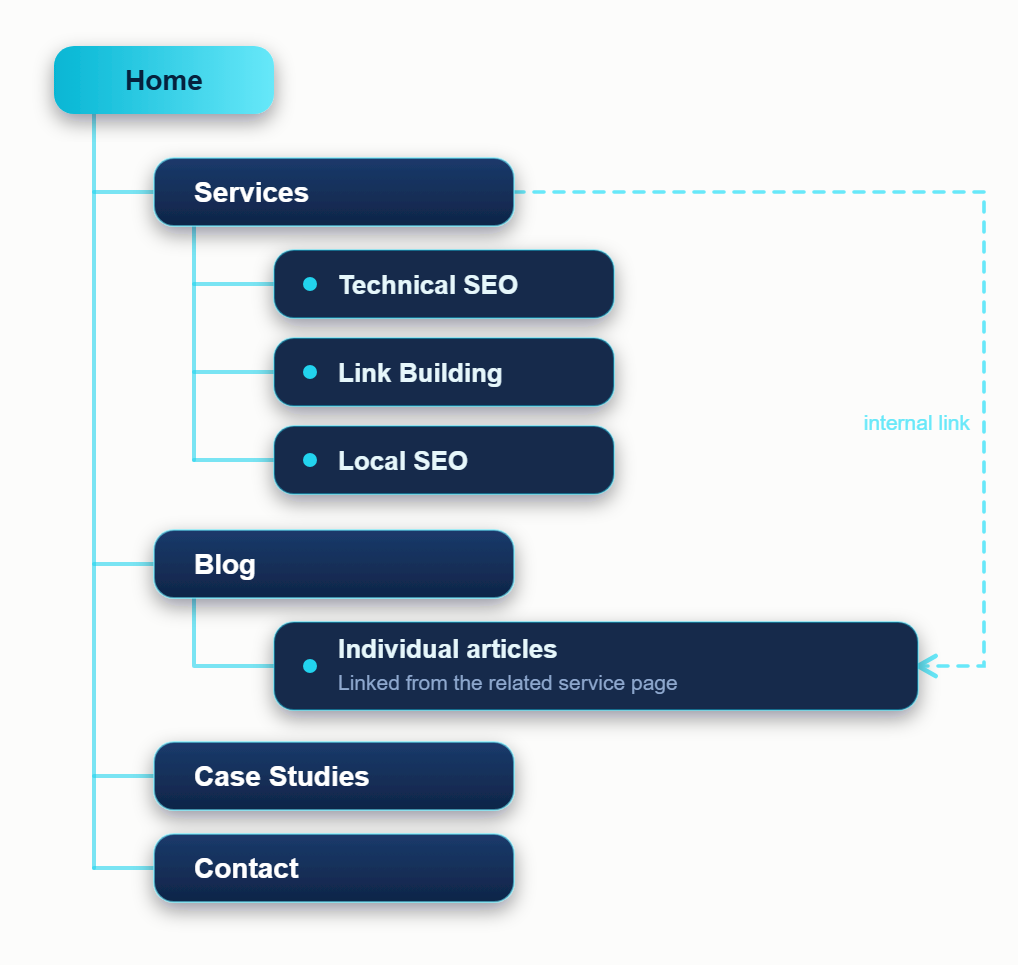
The reason this matters is simple. Google uses your internal links to work out which pages are important and how topics relate. When every page is a flat, top-level URL with no hierarchy, you’re asking it to guess.

If you’re working with an existing website that has grown messy over the years, with duplicate sections, random URLs and pages that nothing links to, you don’t always need a rebuild. A proper architecture cleanup can fix most of it without starting from zero.
Make Sure Google Can Actually Crawl It
This is where beautiful sites fail most often. If a crawler can’t follow your links or render your content, it doesn’t matter how good the writing is.
A few things I check on almost every audit:
- Navigation built with real HTML links, not click events that only work in a browser
- Important content that loads in the page, not only after a user interaction
- Pages that nothing links to (orphan pages)
- Redirect chains and broken internal links
- Server errors that only show up for bots
You can test a single page quickly with the URL Inspection tool in Google Search Console. Look at the rendered HTML and ask whether your main content and links are actually there. If they aren’t, you’ve found your problem. For bigger sites, dedicated crawlability fixes are usually the fastest win, because nothing else works until the crawl is clean.
Your robots.txt File Is Small but Dangerous
One line in this file can take a whole website out of Google. I’ve seen it happen after launches more than once, usually because a staging setting that blocks all crawlers was copied to the live site.
A few rules I follow:
- Never block CSS or JavaScript files Google needs to render the page
- Don’t use robots.txt to hide pages you want removed from search. It blocks crawling, not indexing, so a blocked URL can still show up in results
- Always point to your sitemap in the file
- Re-check it on launch day, every time
If you’re not sure what your file is doing, a quick robots.txt optimization review takes very little time and can prevent a very expensive mistake.
Give Search Engines a Clean XML Sitemap
A sitemap is a map you hand to Google and say, these are the pages that matter. It’s a hint rather than a command, but a good one speeds up discovery, especially on new or large sites.
The mistake I see most is the auto-generated sitemap that lists everything: redirected URLs, noindex pages, parameter junk and duplicate versions. That sends mixed signals. Your sitemap should contain only live, indexable, canonical pages, with accurate last-modified dates. A custom XML sitemap built around your real structure does this properly, and for larger websites splitting it by content type makes problems far easier to spot in Search Console.
Keep URLs Clean and Navigation Simple
Your URL should tell a person what the page is before they click. /services/technical-seo/ says it. /page?id=4821&cat=7 doesn’t.
Use lowercase, hyphens, short descriptive words and a folder structure that mirrors your site. Once a URL is live and ranking, leave it alone unless you have a real reason to change it.
The same thinking applies to your menu. Five to seven clear items beat fifteen clever ones. Call it Services, not What We Do. People scan, they don’t decode. Then support the menu with internal links inside your content, because that’s where much of the real ranking power moves between pages.
Page Speed Is a Design Decision
Speed isn’t something a developer sprinkles on at the end. It’s decided by the choices made at the start: how heavy the hero is, how many fonts you load, how many plugins and third-party scripts run on each page.
The usual culprits are oversized images, autoplay background videos, too many font weights, bloated page builders and chat widgets that load on every page. Each one feels small. Together they add seconds. A focused page speed optimization pass, compressing images, deferring scripts, fixing caching and cleaning up code, often changes how a site feels overnight.
Google measures real-world experience through Core Web Vitals. These are the targets worth knowing:
| Metric | What it measures | Good score |
|---|---|---|
| LCP (Largest Contentful Paint) | How fast the main content appears | 2.5 seconds or less |
| INP (Interaction to Next Paint) | How quickly the page reacts when someone taps or clicks | 200 ms or less |
| CLS (Cumulative Layout Shift) | How much the layout jumps while loading | 0.1 or less |
One tip that helps a lot of people avoid confusion: don’t rely on the lab score. A tool like PageSpeed Insights runs a test but the field data, in Search Console shows what real visitors actually experience on real phones. If those two numbers don’t match, go with the field data.. If your scores stay in the red even after you’ve done your best focused Core Web Vitals optimization is usually the answer. The real issues are often hidden in the theme or the scripts not in the things you can see.

Design for Mobile First, Not Mobile Later
Google uses the mobile version of your site for indexing and ranking. In practice, your phone layout is your website as far as Google is concerned. A desktop design squeezed onto a small screen doesn’t count.
Pick up an actual phone and check:
- Can you read the text without zooming?
- Are buttons big enough to tap without hitting the wrong one?
- Is any content on desktop missing from mobile?
- Do pop-ups cover the page or block the content?
- Does the form work comfortably with one thumb?
If you find yourself pinching and zooming, so will your visitors, and they’ll leave faster than you can say bounce rate.

Get the On-Page Basics Built Into the Design
A design template should make the basics easy, not painful. Every page needs one H1 that states what it’s about, logical H2 and H3 headings under it, a unique title tag and meta description, descriptive image alt text and real, visible text content.
Here’s a mistake I see constantly a heading thats bold oversized text instead of a real heading tag. To a visitor it looks identical. To a crawler or a screen reader the page has no structure all. Styling should come from CSS. The tag should describe meaning.
If your templates make these fields hard to edit they’ll get skipped and your team will publish pages with missing titles and empty alt text. That’s why our on-page SEO work often starts with fixing the template not the pages.
While you’re at it add data (schema) that genuinely matches each page such as organisation article FAQ or service markup. It helps search engines understand your content with guesswork and it can make you eligible, for richer results. Only mark up what visitors can actually see and validate it before you publish.
Build for AI Answers as Well as Search Results
A growing share of people get their answers from AI Overviews and chat assistants before they ever click a result. Those systems lean on pages that are easy to parse: a direct answer near the top of each section, clear headings, short paragraphs, lists, tables and visible signs of who wrote it and why they can be trusted.
The good news is that this is the same structure good design already encourages. If you want to go deeper, generative engine optimization and answer engine optimization both build on exactly this foundation.
And remember that design only gives your content a place to live. It’s your content marketing that gives people and AI systems a reason to cite you.
Redesigning an Existing Website? Protect What You’ve Already Earned
This is the section I’d underline twice. A redesign is the most dangerous moment in a website’s SEO life, because it’s the moment you can throw away years of rankings without noticing.
Before anything goes live, make a full list of your current URLs and decide what happens to every one of them. Pages that move need a proper 301 redirect to the most relevant new page, not a blanket redirect to the homepage. Pages that rank today should keep their content and their intent. A careful redirect optimization plan protects the link value those pages have collected, and it stops visitors landing on dead ends.
After launch, watch Search Console closely for the first few weeks. A small dip is normal. A steady slide means something was missed, and you want to catch it early.
Mistakes I See Again and Again
- Hiding important content inside tabs, sliders or scripts that crawlers handle poorly
- Putting text inside images, where it can’t be read, translated or searched
- Treating mobile as a final-week task
- Launching with a leftover noindex or Disallow setting from staging
- Skipping redirects during a redesign
- Loading heavy page builders, plugins and tracking scripts on every page
- Publishing thin pages with lots of design and almost no useful content
- Forgetting to check Search Console after launch
SEO-Friendly Website Design Checklist
Run through this before any site goes live:
- Site architecture planned around keywords and search intent
- Clean, logical URLs
- Mobile-first layout tested on real phones
- Core Web Vitals in the good range
- One H1 per page, proper heading order
- Unique title tags and meta descriptions
- Descriptive alt text and image file names
- Internal links between related pages
- Schema markup added and validated
- Clean XML sitemap submitted in Search Console
- robots.txt checked and staging blocks removed
- 301 redirects mapped for every changed URL
- Analytics and Search Console connected
When It’s Worth Getting an Audit
If your site looks great but isn’t bringing in traffic, there’s almost always a technical or structural reason, and it’s usually fixable without a rebuild. A proper technical SEO audit shows you exactly what’s blocking growth, in order of priority, so you’re not guessing or fixing things that don’t matter.
Once the foundation is solid, the next layer is authority. Good link building and strong technical SEO together are what turn a well-built site into a site that ranks.
Not sure where yours stands? Get a free SEO audit from Search Forge Digital and I’ll tell you what’s holding it back.


